
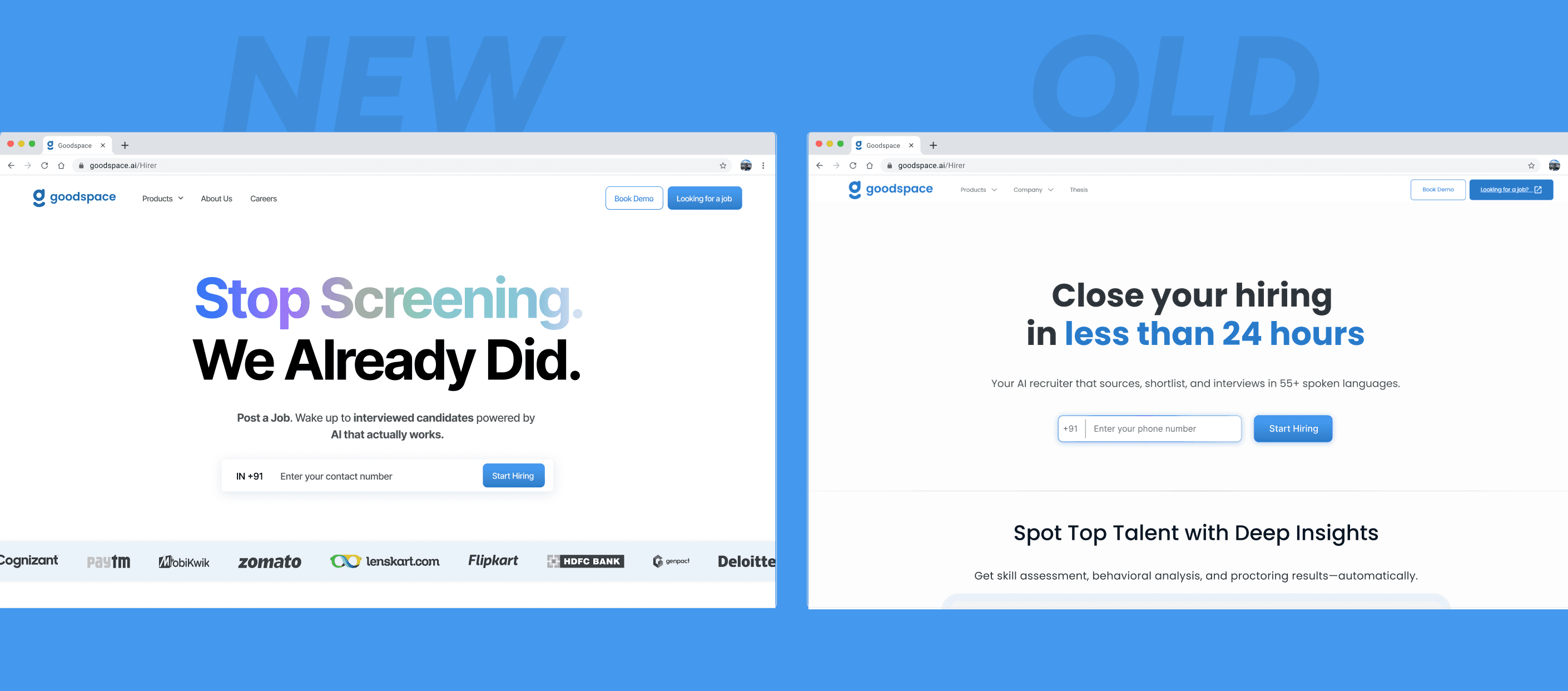
View complete landing page design →
What's happening on this screen
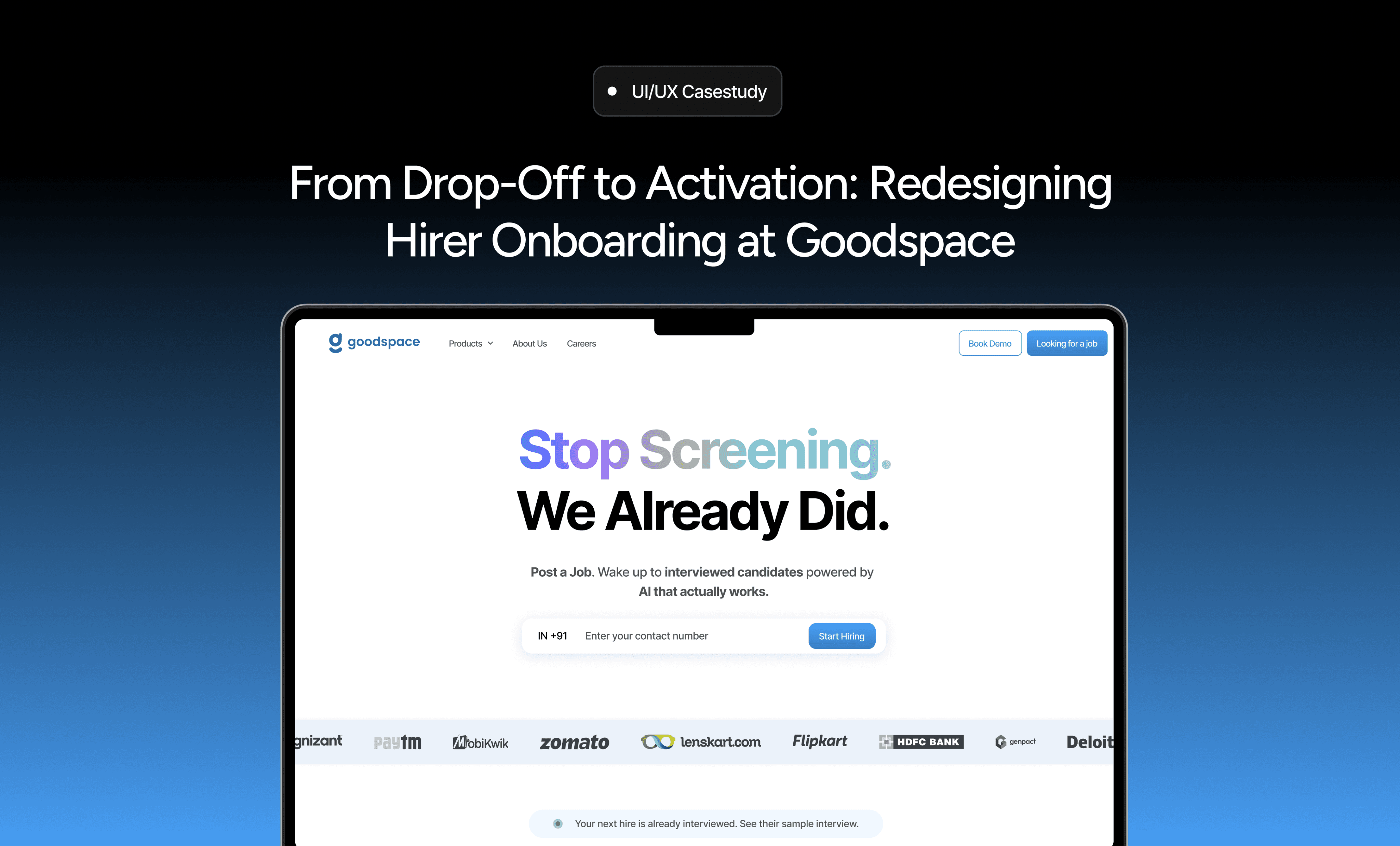
This is the first touchpoint for a hirer entering Goodspace. The goal is to reduce friction, clearly communicate the AI-led hiring value, and help users move confidently from exploration to action.
Instead of overwhelming users with forms, the flow starts with a single action and gradually introduces the hiring process through clear messaging and visual hierarchy.
Key elements:
Clear value proposition explaining AI-led hiring upfront
Single low-effort action: phone number only
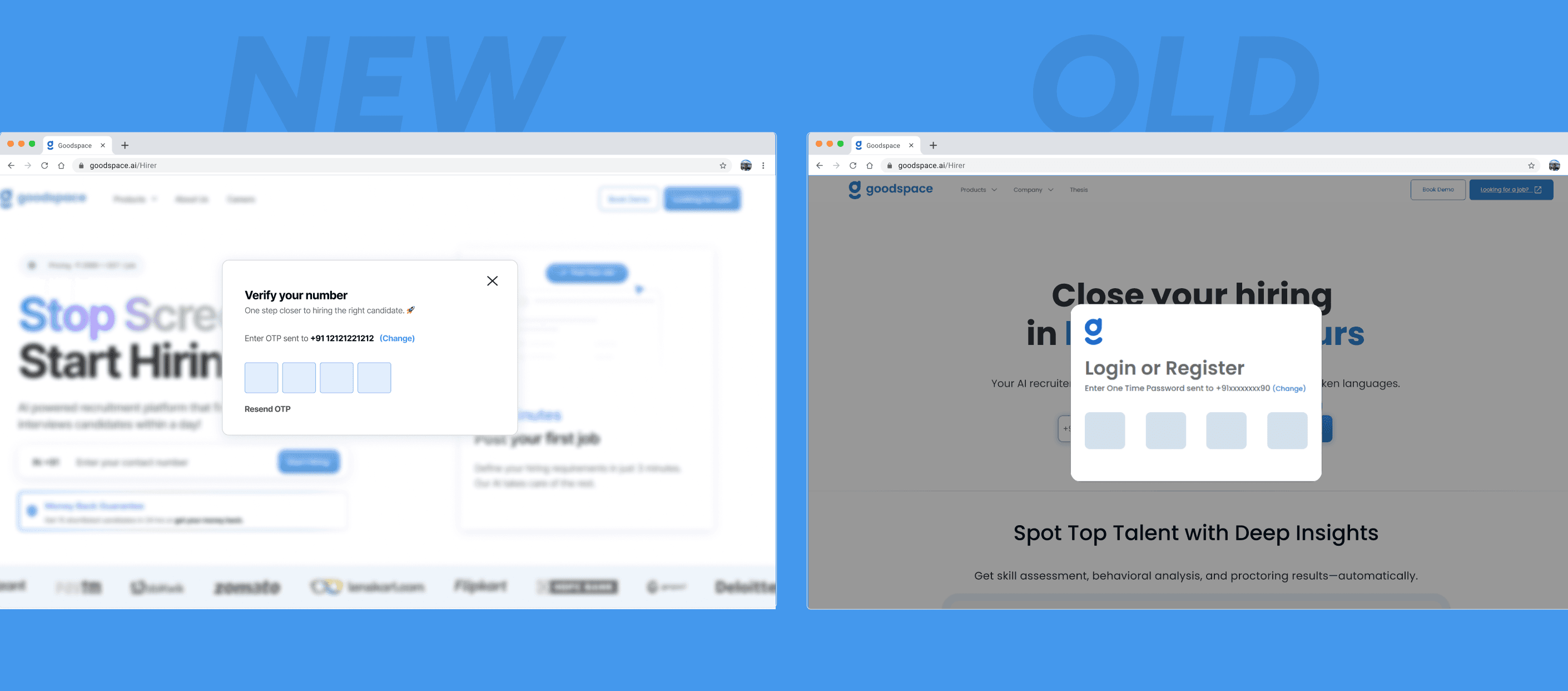
OTP verification to enable quick, secure access
Smooth transition into a guided onboarding flow
What's improved
Strong headline: "Stop Screening. We Already Did." immediately positions Goodspace as an AI-first hiring platform
Clear hierarchy guides attention from value → explanation → action
Phone number + OTP feels purposeful, not bureaucratic
Sets expectations that AI will handle screening and interviews after job posting
Old Landing Experience
The earlier experience focused on initiating job posting without explaining how the platform actually works.
What wasn't working
One-step authentication with automatic redirection after OTP entry
“Change number” and “Resend OTP” options reduce friction and errors
Feels like a gateway into the hiring flow, not a standalone login screen
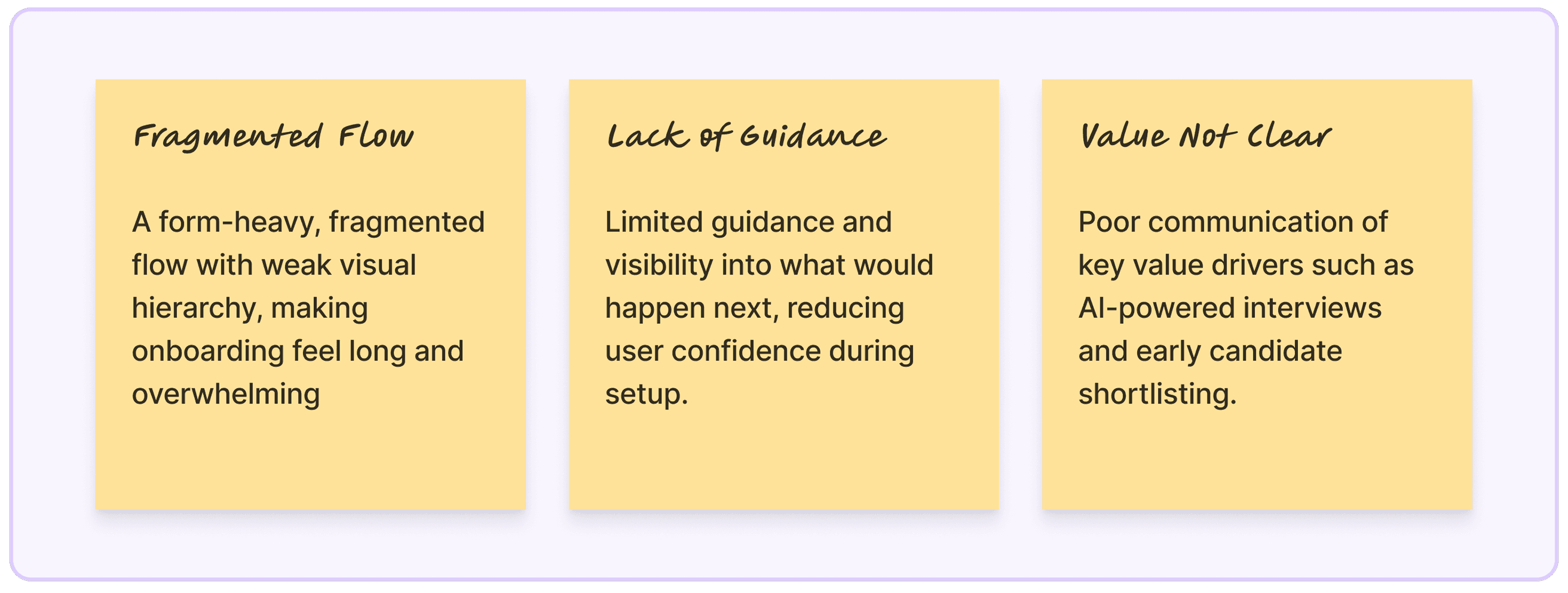
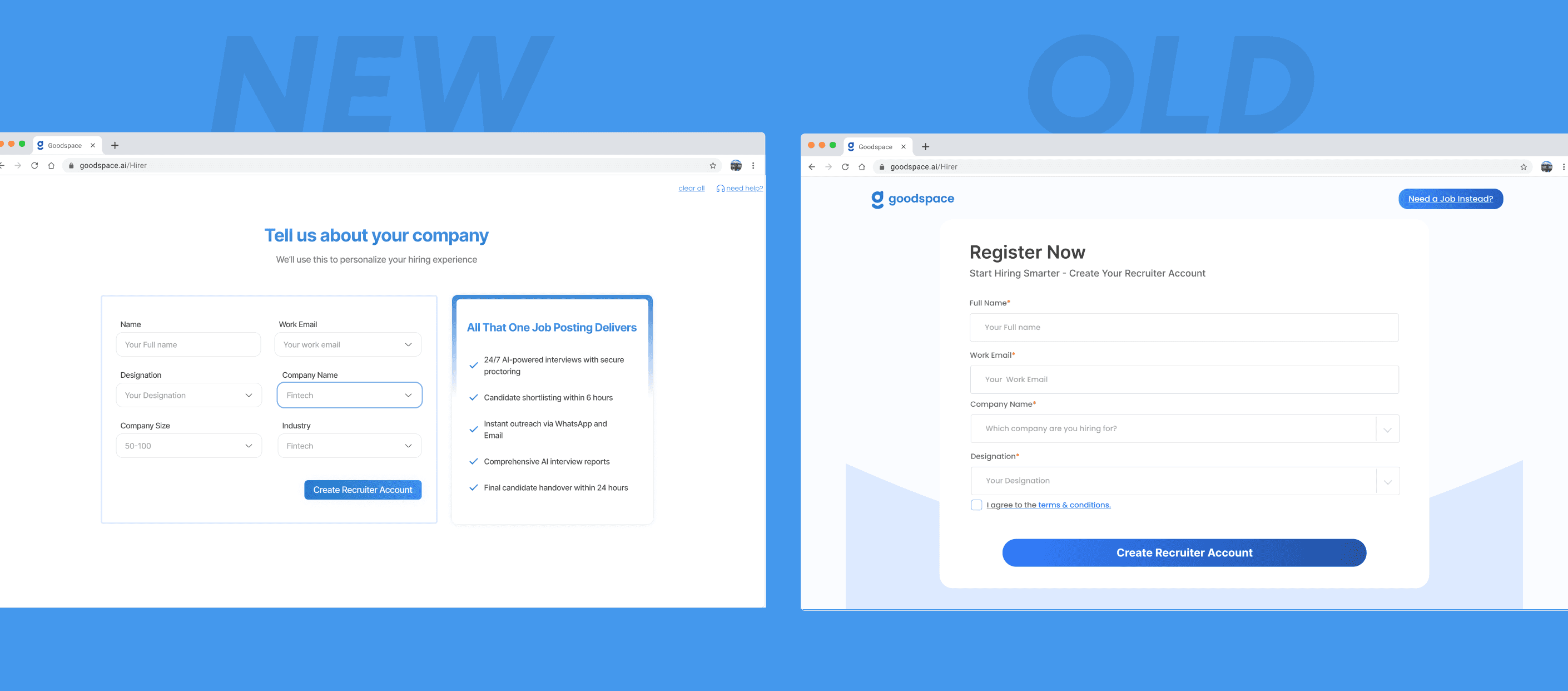
Before diving into solutions, it was critical to understand where the biggest drop-off was happening and why. The data pointed to one critical moment: immediately after registration.
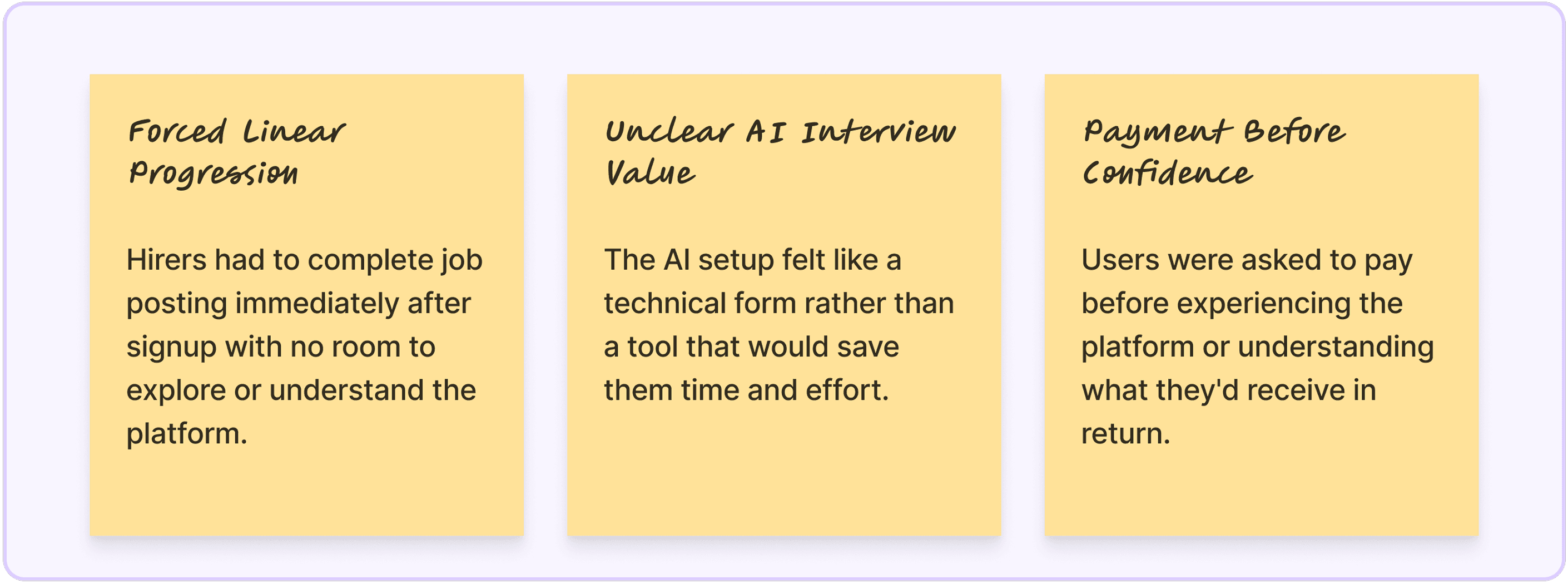
In the earlier flow, users were taken directly from registration into a lengthy, multi-step job posting process that included job details, AI interview configuration, and payment, all in one continuous sequence. This meant hirers were forced to make multiple high-commitment decisions within minutes of signing up, with no opportunity to pause, explore, or understand what they were committing to.
The problem wasn't just the length of the flow. It was the lack of breathing room. Users had no chance to explore the platform, understand how the dashboard worked, or build confidence in what Goodspace could do for them. They were being asked to trust the platform before they understood it.
This resulted in significant abandonment. Hirers would start the process but drop off before completing job activation, not because they weren't interested, but because the experience demanded too much, too soon.
The Problem
Previously, completing registration immediately triggered the job posting flow. Users had no choice but to continue or abandon. There was no middle ground, no way to explore, no way to understand the platform before committing time and effort.
The Solution
After registration, users now land on the Hirer Dashboard. This gives them a moment to orient themselves, see what actions are available, explore features, and understand how Goodspace works before deciding to post their first job.
Why This Works
Reduces cognitive load: Users aren't overwhelmed by immediate decisions
Builds familiarity: They can explore the interface before committing
Increases control: Users choose when they're ready to post, not the system
Lowers abandonment: The experience feels less forceful and more welcoming
By separating registration from job posting, the flow became more intentional, controlled, and less overwhelming. Users could build confidence in the platform before making their first real commitment.
The dashboard-first approach was part of a fundamental shift in how onboarding was sequenced. Instead of forcing immediate commitment, the new flow needed to prioritize exploration, clarity, and confidence-building.
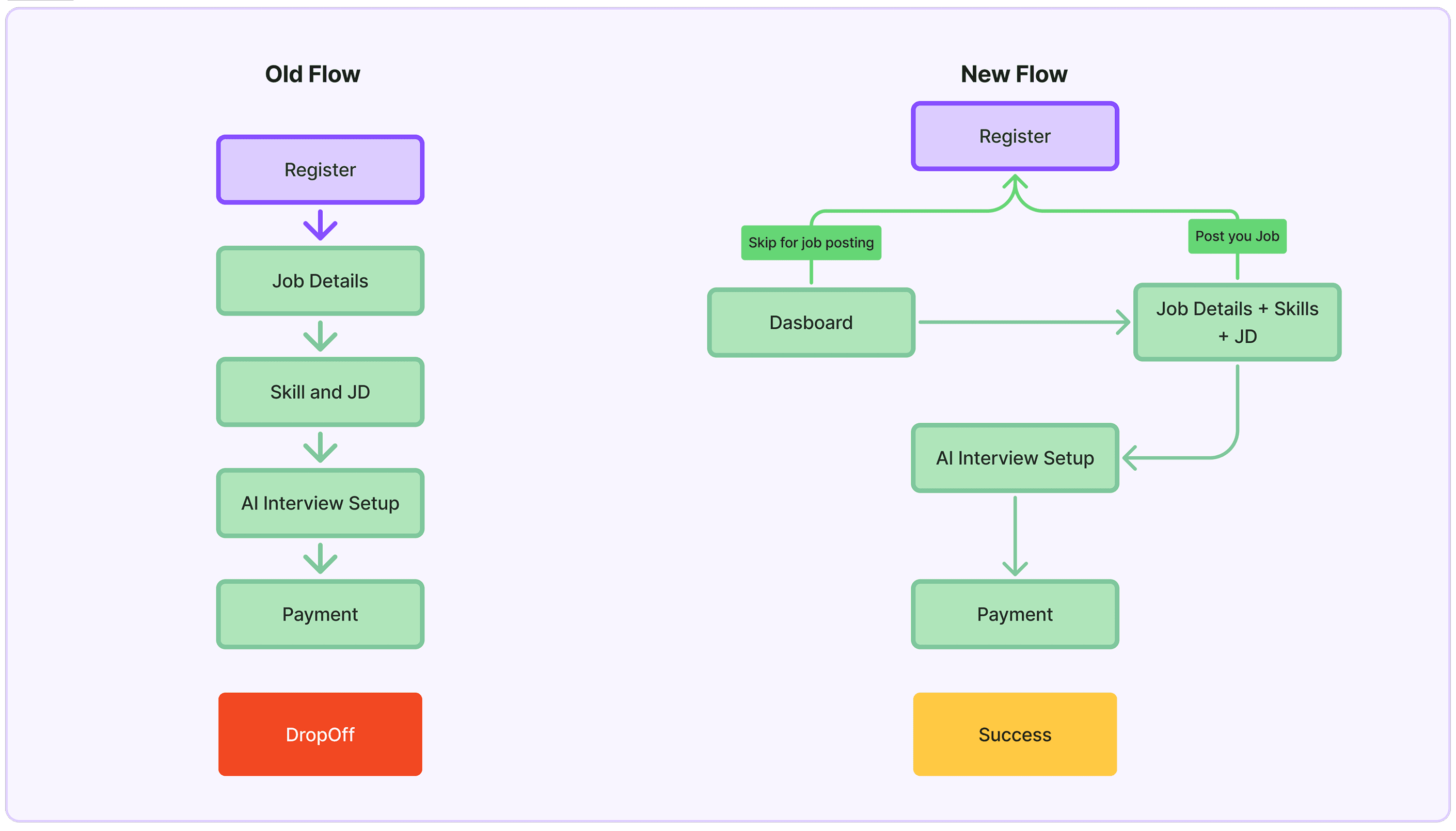
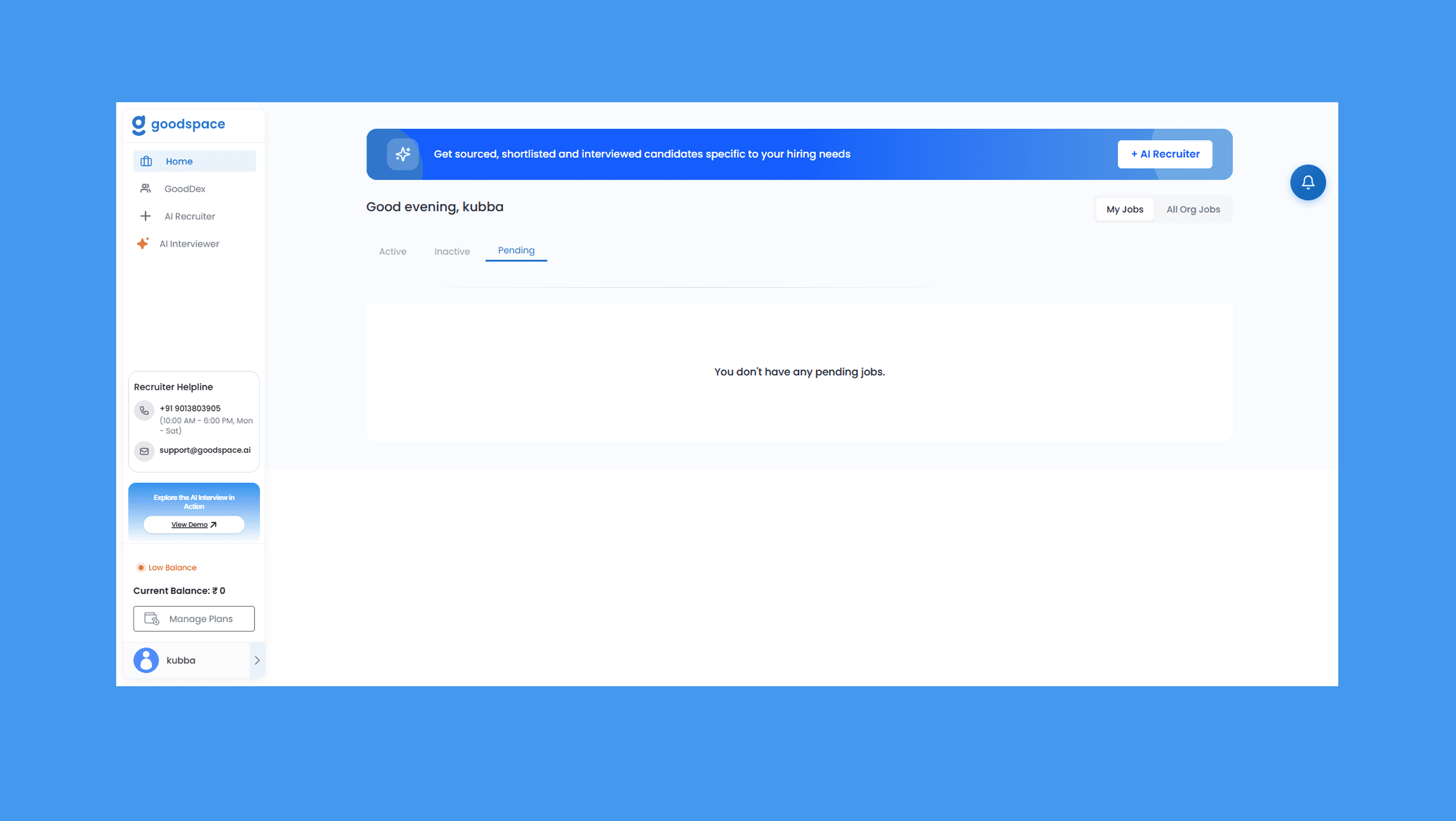
The key change: inserting a pause between registration and commitment. By redirecting users to the dashboard first, we gave them control over when to post a job, rather than forcing them into it immediately. This structural change set the foundation for all subsequent improvements in the job posting experience.
The Problem
In the earlier design, job posting functioned purely as a data collection form. Hirers entered role details, experience requirements, location, and compensation, but received no feedback on how these inputs would affect candidate availability or hiring outcomes.
Users had to rely on assumptions. They had no visibility into whether their requirements were realistic, whether candidates existed for their role, or whether their compensation was competitive. They only discovered these issues after publishing the job, which often led to frustration and poor results.
The Solution
The redesigned job posting experience is interactive and insight-driven. As hirers enter job details, a live candidate pool preview appears on the right side, showing estimated availability based on the role, location, and compensation they've specified.
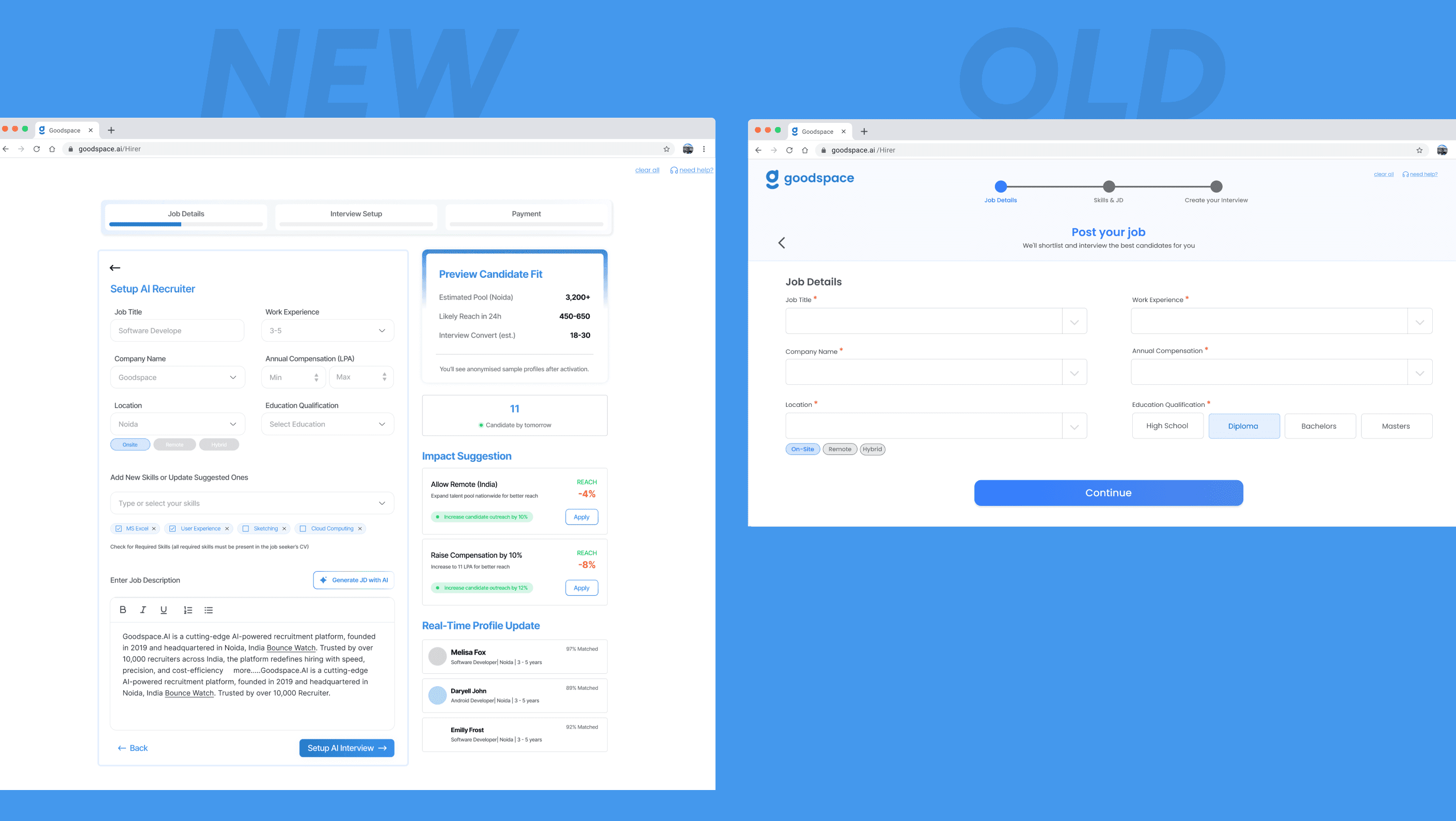
The preview updates in real-time as users adjust inputs, giving them immediate feedback on:
Estimated number of candidates available
Salary benchmarks for similar roles
Impact suggestions (e.g., "Increase max salary by 15% to access 3,000+ more candidates")
Why This Works
Reduces uncertainty: Hirers know upfront if their job setup is realistic
Builds trust: Real-time data reinforces Goodspace's AI-led promise
Improves job quality: Users make better decisions with visibility into outcomes
Increases confidence: Seeing a candidate pool before publishing reduces anxiety
This feature transformed job posting from a blind form-fill into an informed, data-backed decision-making experience. By making candidate availability visible upfront, the design helped hirers set realistic expectations and reduced the likelihood of poorly configured jobs.
The Problem
The AI interview setup previously felt like a technical configuration step—fields for interview duration, question types, and assessment criteria without clear explanation of what users would receive or why it mattered.
Hirers saw it as an obstacle rather than a value-add. The language was technical, the benefits weren't clear, and many users didn't understand how AI interviews would save them time.
The Solution
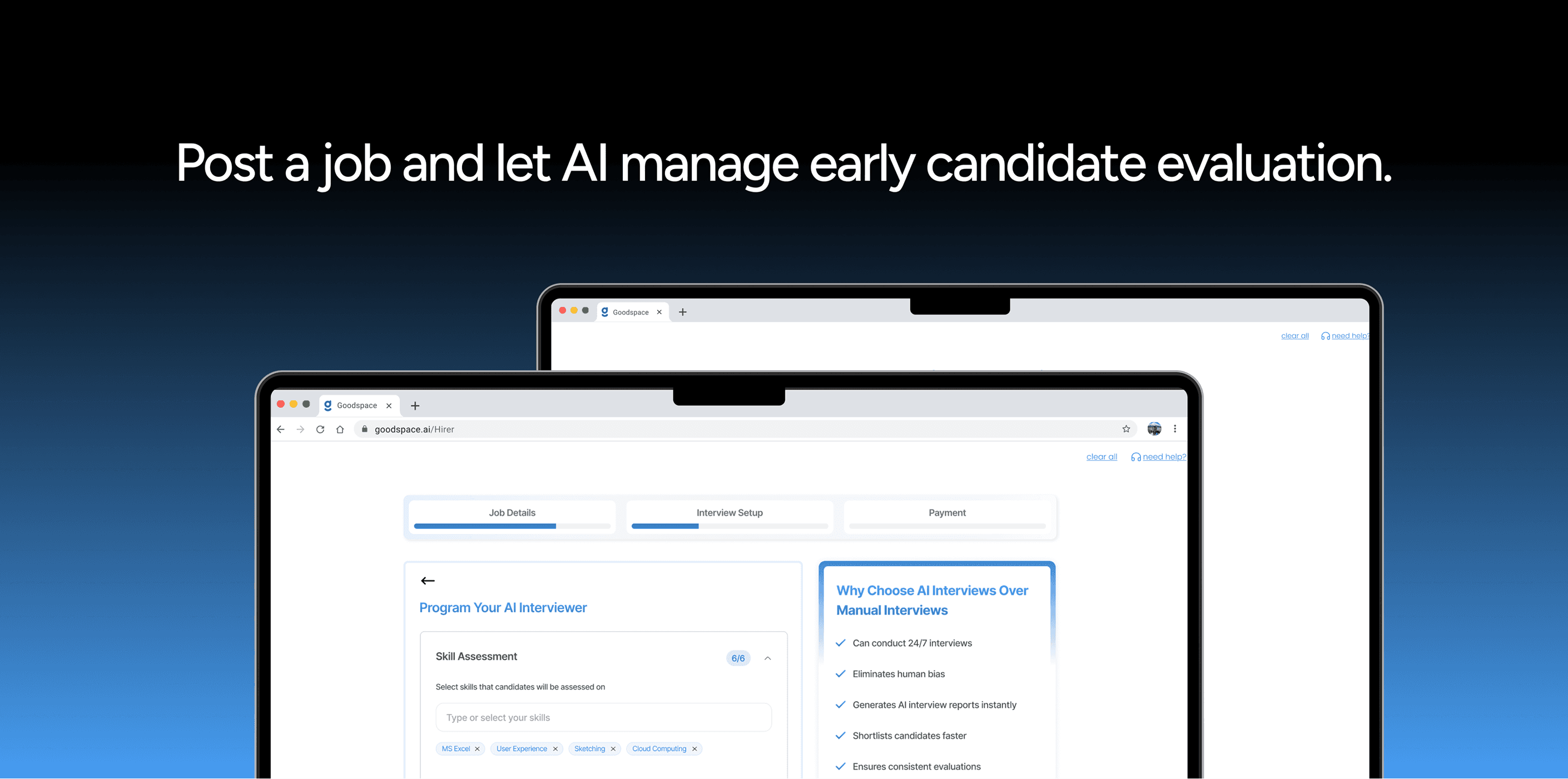
The AI setup was reframed as "Programming Your AI Interviewer"—shifting the mental model from technical configuration to value-driven automation.
The new design:
Explains what the AI interviewer does (conducts structured interviews at scale)
Shows what hirers will receive (pre-screened, shortlisted candidates with interview insights)
Emphasizes time saved (no manual resume screening, faster shortlisting)
Uses clear, benefit-focused language instead of technical jargon
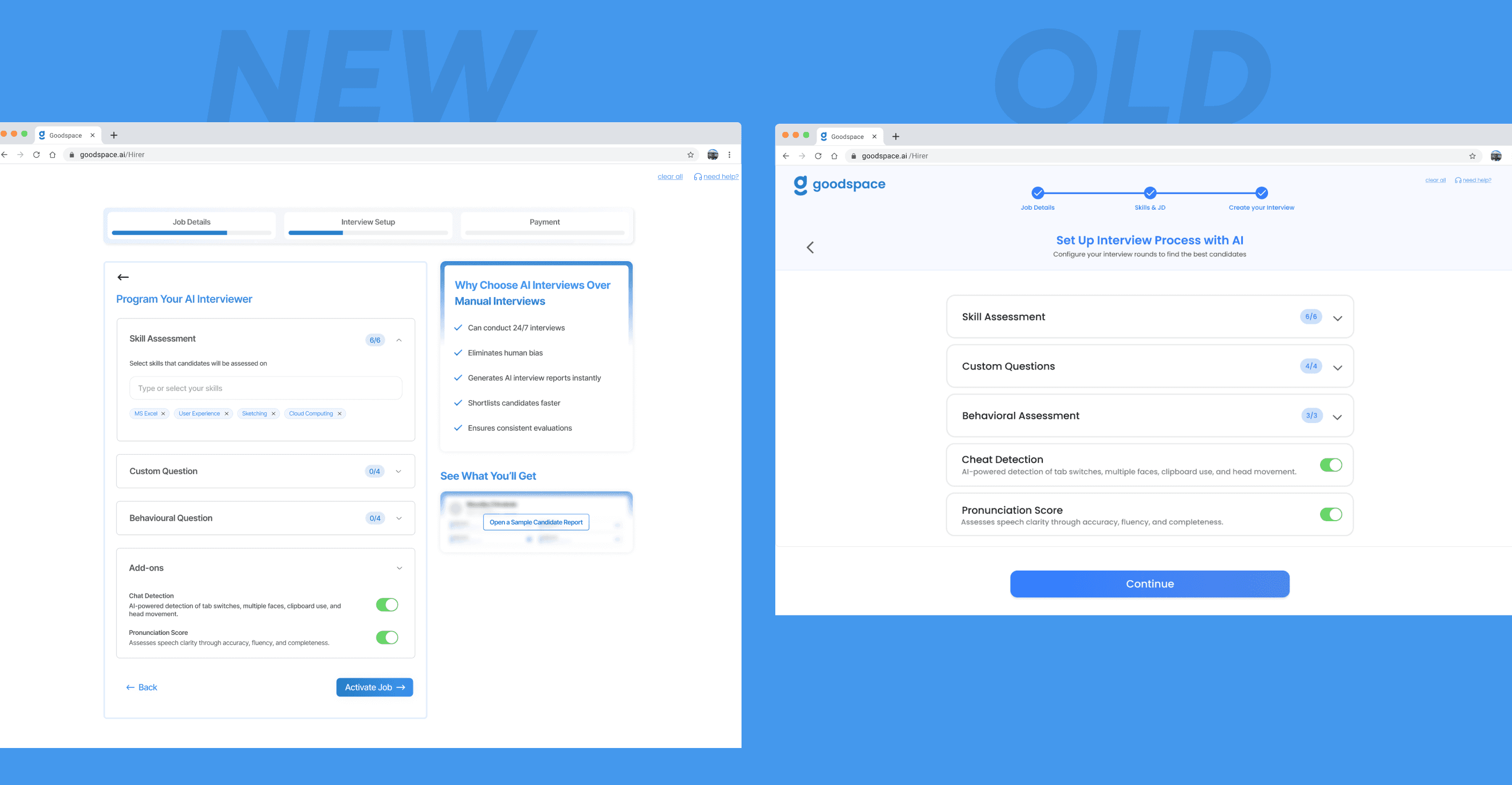
Why This Works
Clarifies value: Users understand what they're getting, not just what they're configuring
Reduces friction: The step feels helpful rather than bureaucratic
Increases completion: When users see the benefit, they're more likely to finish setup
Reinforces platform promise: Positions Goodspace as a smarter, AI-powered solution
By reframing the experience around value rather than configuration, the AI setup became a feature hirers wanted to complete rather than a form they had to endure.
The Problem
Previously, users reached the payment step without fully understanding what they were paying for or what would happen next. The lack of transparency created anxiety and doubt, leading to abandonment at the final step.
The Solution
The payment screen was redesigned to reduce friction and build confidence at the critical conversion moment.
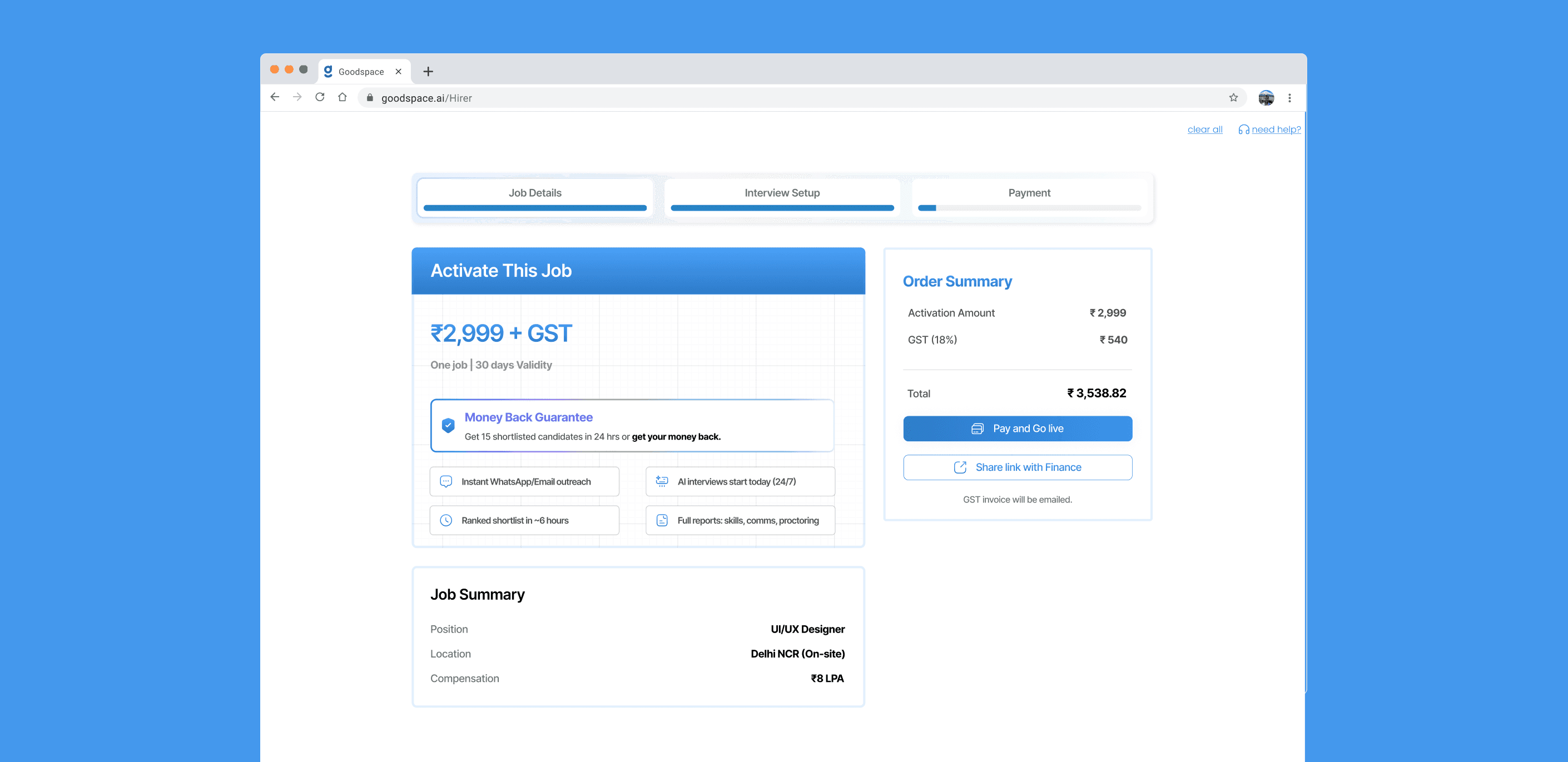
Key improvements:
Share link with Finance" option to support common company workflows where HR creates jobs but finance handles payments
Job summary preview to help users confirm critical details before payment, reducing the need to go back and recheck earlier steps
Money-back guarantee highlighted prominently to lower hesitation at the final conversion step
Reinforced core product value (AI interviews, fast shortlisting, instant outreach) to justify pricing at the moment of decision
Clear breakdown of what's included in the package
Explanation of what happens after payment (job goes live, AI interviews begin, candidate notifications sent)
Reassurance that users can pause, edit, or modify jobs anytime
Why This Works
Reduces payment anxiety: Users know exactly what they're paying for
Supports real workflows: Finance link accommodates organizational approval processes
Sets expectations: Clear communication about what happens next
Builds trust: Transparency and guarantees signal confidence in the product
Confirms decisions: Job summary prevents last-minute doubts
Increases conversion: When users feel informed and supported, they're more likely to commit
The goal wasn't just to get users to pay but to make sure they felt confident and informed when making that decision.
This screen appears immediately after the hirer completes payment and successfully submits the job. Its primary purpose is to confirm success, reduce post-payment anxiety, and clearly communicate what happens next.
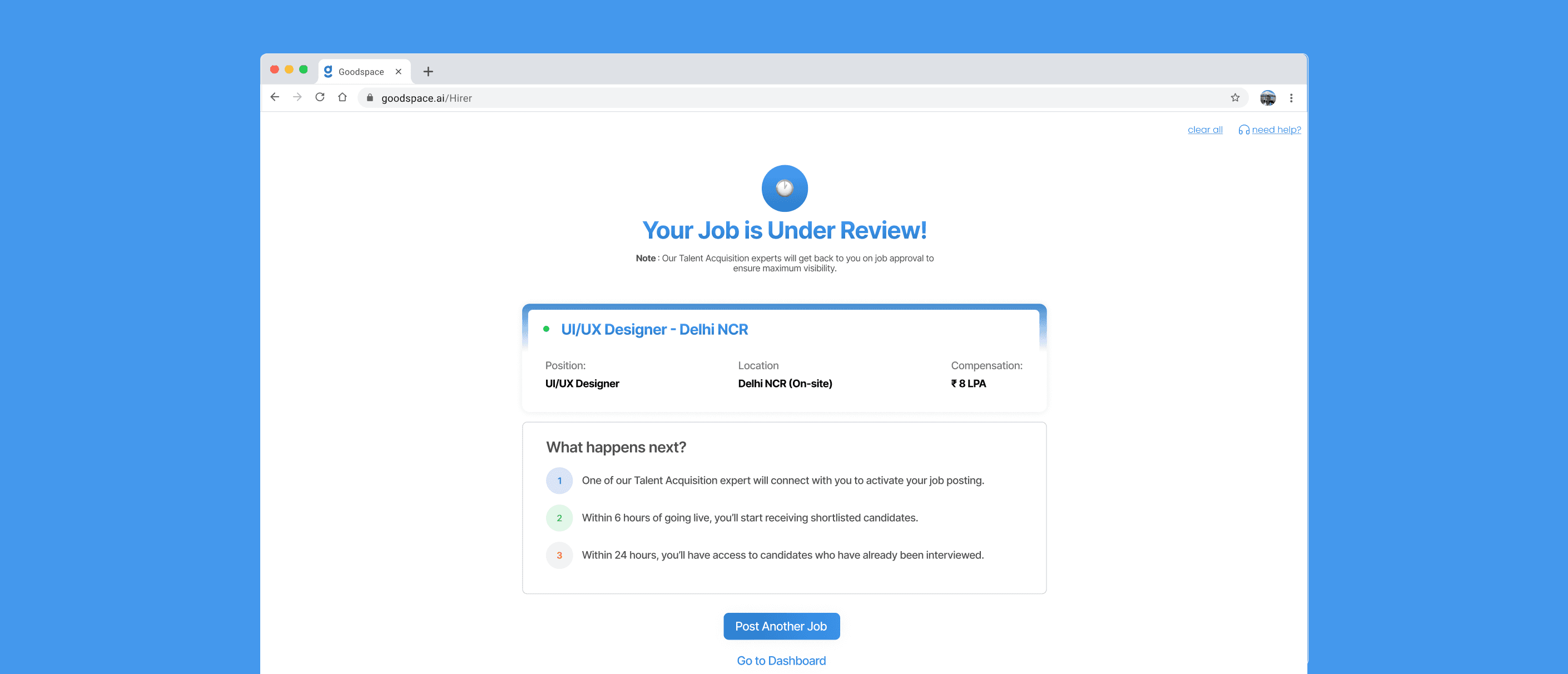
What's Working Here
The screen reassures the hirer that their job has been received and is currently under review by the Goodspace team. Instead of ending the flow abruptly, it provides clear next steps so users know exactly what to expect and when.
Key elements:
Clearly communicated job status ("Under Review") to reassure users immediately after payment
Included a step-by-step timeline to set expectations around activation, shortlisting, and interviewed candidates
Recapped key job details so users feel confident about what they've submitted
Provided clear next actions (Post Another Job or Go to Dashboard) to avoid dead ends after onboarding
Why This Works
Reduces post-payment anxiety: Users see confirmation that their job was received
Sets realistic expectations: Timeline shows when activation and shortlisting will happen
Reinforces confidence: Job summary confirms correct role, location, and compensation
Maintains momentum: Clear next actions let users continue without friction
Prevents abandonment: Users don't feel lost after completing the high-commitment step
By summarizing the submission, explaining what happens next, and offering clear paths forward, this screen transforms a potential dead end into a confidence-building moment that keeps users engaged with the platform.
Each design decision was made with one core principle in mind: don't force commitment before building confidence.
By restructuring the flow to prioritize exploration, providing real-time insights during job posting, reframing AI setup as a value-add, and creating transparency around payment, the redesigned experience transformed onboarding from a barrier into an enabler.
Users could now explore before committing, understand before investing, and activate with confidence rather than doubt.